

PlantPulse — Manufacturing Intelligence, Delivered
Home · PlanningIQ
PlanningIQ · AI production planning (PPC) and S&OPEarly access

Plans that hold up against what the plant can really do

PlanningIQ is the planning brain of PlantPulse. It turns forecast, orders, opening stock, raw and packing material, capacity, OEE, quality stability, machine condition and dispatch priority into a weekly master schedule, a material plan and daily and shift schedules, and replans when the plant changes. It plans production, material and dispatch readiness, not finance.

Feasible, not theoretical

Capacity is OEE-adjusted and checked against quality holds, maintenance windows and material, not a nominal rate.

Explainable and approved

Every plan shows why it is recommended and what it changes. Nothing is released without the planner's approval.

With or without ERP

Demand and orders come from your ERP, or are entered and imported directly; shortages are checked against PlantPulse's own stock record.

Demand and forecast

Start from demand you can trust

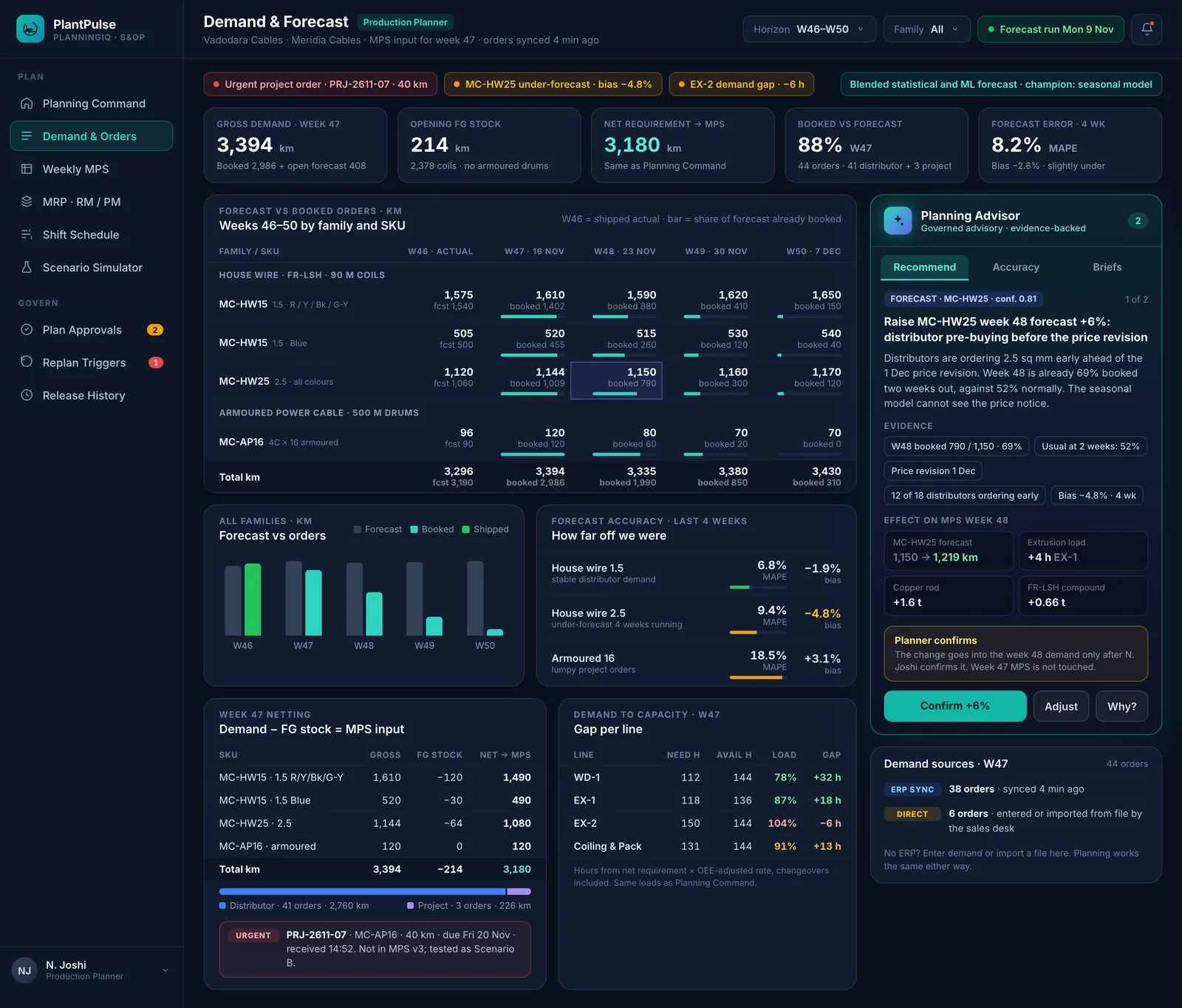
Forecast and booked orders side by side by product family and SKU, with forecast accuracy and bias, opening finished-goods stock and the net requirement that feeds the plan. A blended statistical and machine-learning forecast learns from your own history.

  • Forecast vs orders by family and SKU, week by week
  • Accuracy and bias tracked, with forecast changes proposed and confirmed by the planner
  • Demand-to-capacity gap per line before the plan is built
Demand & Forecast · Meridia Cables, Vadodara
Demand & Forecast · Meridia Cables, Vadodara · fictional demo data
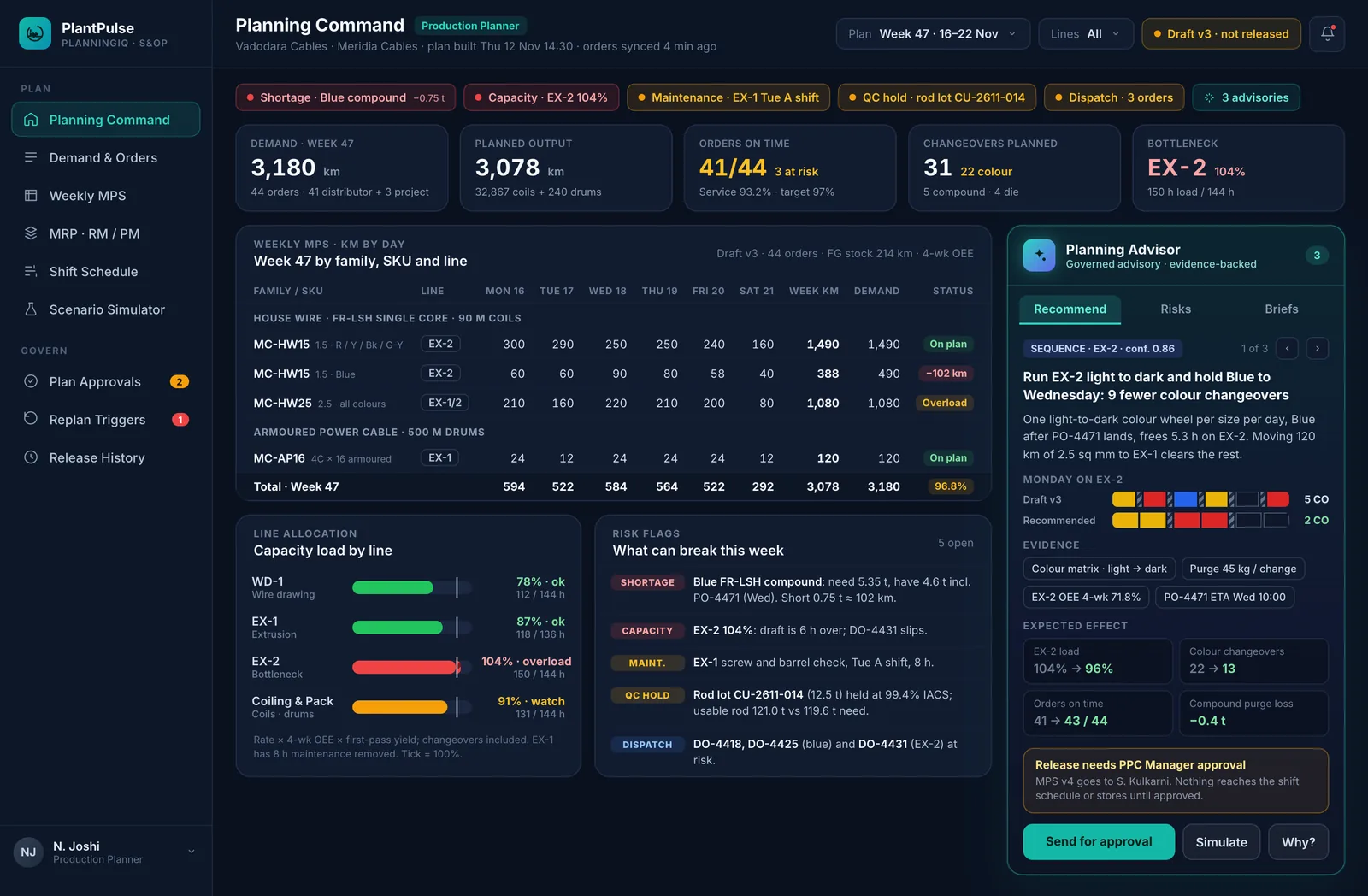
PlanningIQ Command · Meridia Cables, Vadodara
PlanningIQ Command · Meridia Cables, Vadodara · fictional demo data
Master schedule and line allocation

The week's plan, its load and its risks in one place

A weekly master schedule by product family, SKU, plant and line, with OEE-adjusted capacity load and line allocation by capacity, OEE, quality stability and product fit. Shortage, capacity, quality-hold, maintenance and dispatch risks are flagged before release.

  • MPS by family, SKU, plant and line
  • Changeover-aware sequencing with your own rules
  • Five risk types flagged on every plan version
Material requirements (MRP)

Raw and packing material, exploded from the plan

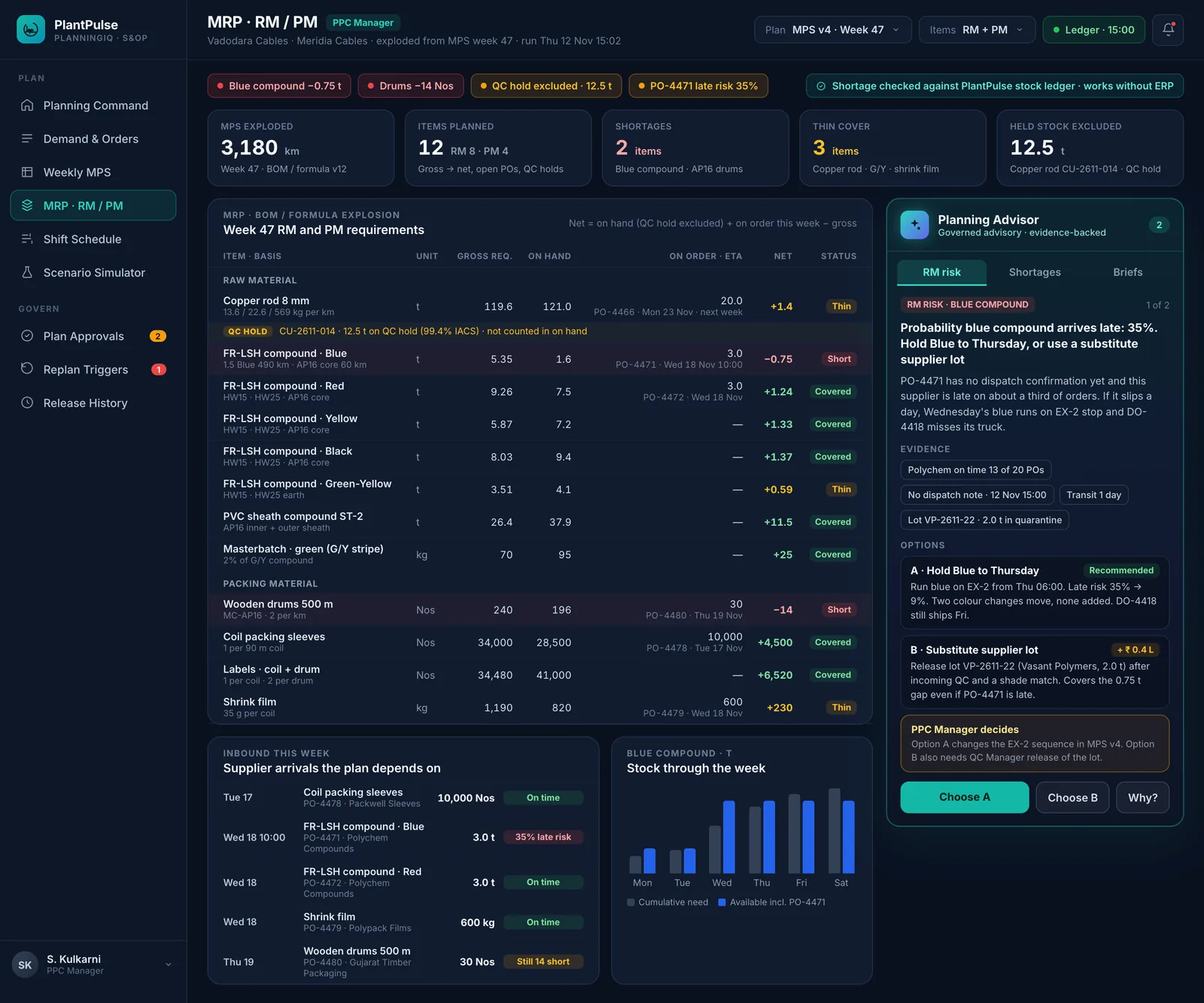
The master schedule is exploded through your BOM or formula into raw and packing material requirements, netted against stock that is actually usable, with lots on quality hold excluded and supplier deliveries in view.

  • RM and PM requirements, on hand, on order and net
  • Lots on quality hold never counted as available
  • Shortage probability simulated for late or failed deliveries
MRP · raw and packing material · Meridia Cables, Vadodara
MRP · raw and packing material · Meridia Cables, Vadodara · fictional demo data
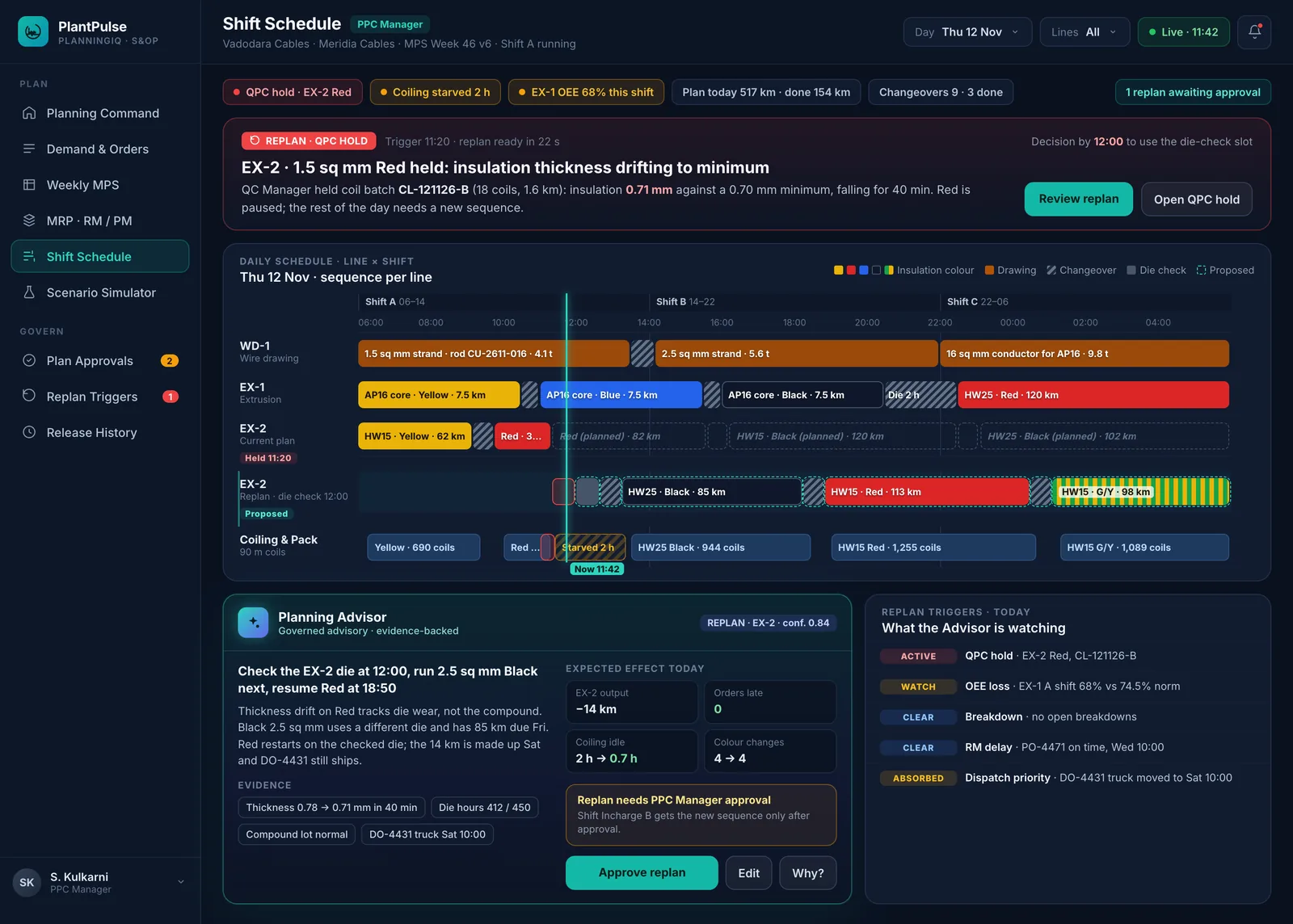
Shift schedule with replanning on a quality hold · Meridia Cables
Shift schedule with replanning on a quality hold · Meridia Cables · fictional demo data
Daily and shift schedule

A shift schedule the floor can run

Day and shift sequences per line with changeovers and die checks built in, released to ProductionIQ once approved, and replanned when the plant changes.

  • Shift-level sequence per line
  • Changeover and maintenance blocks visible
  • Released only after approval, with full version history
Scenarios and replanning

Ask “what if” before the plant asks it for you

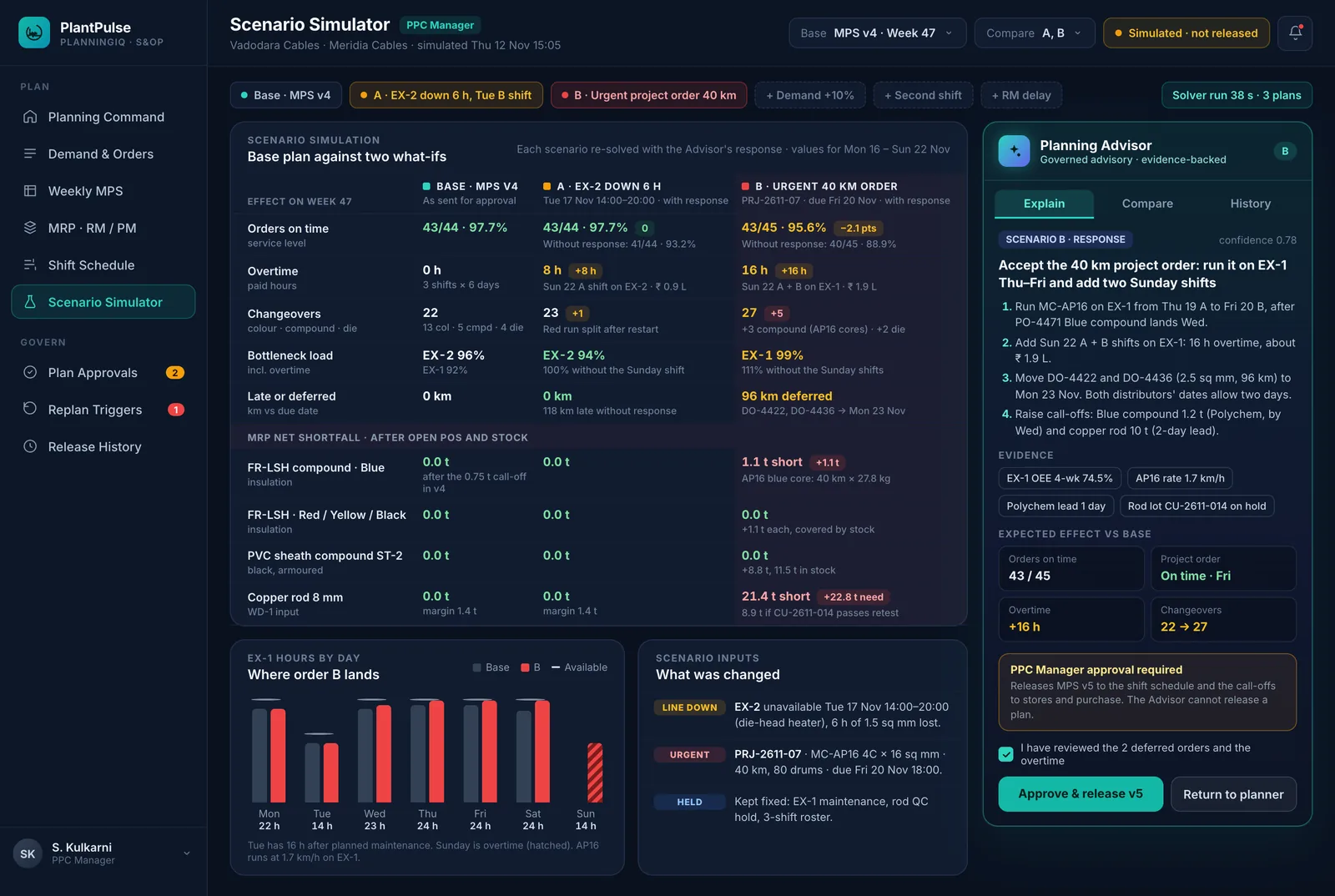
Simulate a demand increase, a line going down, a second shift, a late material delivery or an urgent order, and compare service level, overtime, changeovers and material shortfalls before you commit. When the plant changes, PlanningIQ proposes the replan.

  • Replans on quality holds, OEE loss, breakdowns, material delays, dispatch priority and energy or process abnormalities
  • Side-by-side scenario comparison
  • Approve and release with one decision
Scenario Simulator · Meridia Cables, Vadodara
Scenario Simulator · Meridia Cables, Vadodara · fictional demo data
PlantPulse AI in PlanningIQ

The Planning Advisor, built into the work

PlantPulse is a Manufacturing AIOS: AI is part of the operating loop, not a chatbot on the side. It senses the plant, interprets what is happening, recommends the next step, and hands the decision to the accountable role. The result is verified, and what works becomes the standard.

  1. Sense
  2. Interpret
  3. Recommend
  4. Govern
  5. Execute
  6. Verify
  7. Learn
Planning Advisor in PlantPulse, fictional demo data
PlantPulse AI · PlanningIQEarly access

Planning Advisor

Which plan is feasible, and what changes if demand, a line or a material changes?

  • Forecasts demand by family and SKU and proposes forecast changes
  • Aligns demand with OEE-adjusted capacity and quality stability
  • Builds changeover-aware sequences and line allocation
  • Simulates material shortage risk and what-if scenarios
  • Replans on quality holds, OEE loss, breakdowns, late material or dispatch priority
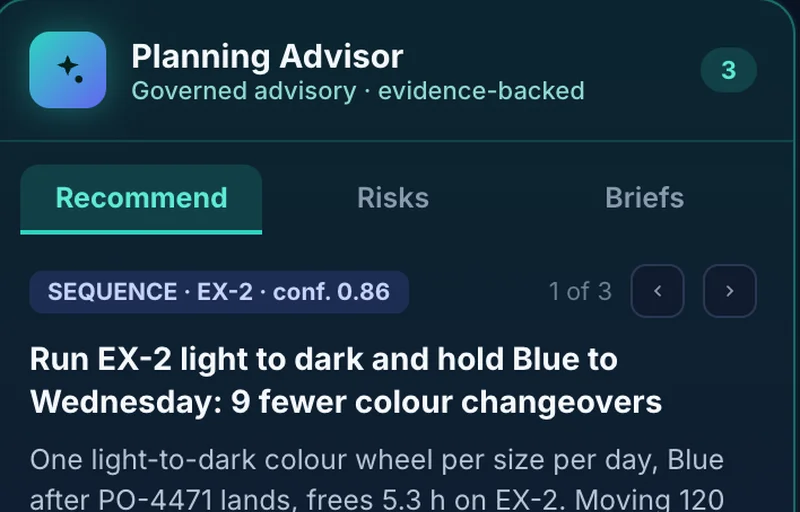
  • Explains every recommendation; the planner approves before release
Example: Run EX-2 light to dark and hold Blue to Wednesday: 9 fewer colour changeovers
Evidence and its strength shownDecides: PPC ManagerNo direct plant change
Works with PerformIQ

One platform, one record, one decision loop

  • Quality holds, OEE loss, SPC drift and energy or process abnormalities from PerformIQ trigger replanning
  • Released schedules become runs and route cards in ProductionIQ
  • Material readiness and stock from FlowTrack WMS
  • Orders, forecasts and stock from your ERP, or entered and imported directly

Built on the PlantPulse platform

Same setup, same operational record, same governance and the same AI guardrails as every other module.

Next step

Request early access to PlanningIQ

Early-access modules are available to selected customers on PlantPulse Cloud and Enterprise, on top of PerformIQ. Tell us about your plant and we will come back with fit and timing.